
General Information
What is the Safewarm W-1000 Patient Warming System used for?
What are the main components of the system?
What is the operating temperature range?
Does the system have a cooling function?
Safety & Warnings
Can adult pads be used for newborns?
What should be checked before using the system?
Can the pads be folded during operation?
Is it safe to use on patients with burns or open wounds?
Is the Safewarm System completely latex-free?
Operation
How do I set the temperature?
How long does it take to reach 37°C?
Alarms
What alarms does the system have?
Can alarms be muted?
Cleaning & Maintenance
Can pads be washed or immersed in water?
What disinfectants can be used?
How often should the system be serviced?
Technical & Warranty
What is the expected product lifespan?
What is the warranty period?
What situations are excluded from warranty?
Troubleshooting
What should I do if the screen shows “HIGH TEMP”?
What does “NO PAD” mean?
What does “INOP” mean?
How do I change the language on the digital display?
General Information
What is the Safewarm Patient Warming System used for?
The Safewarm Patient Warming System is designed to prevent and treat hypothermia by raising and/or maintaining patient body temperature during surgeries and clinical treatments.
What are the main components of the system?
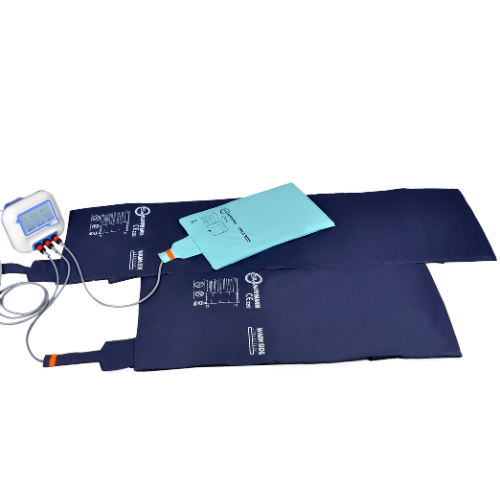
The system consists of a control unit (W-1000) and warming pads (mattresses or blankets).
What is the operating temperature range?
The operating temperature range of the Safewarm warming pads is 30°C - 40°C.
Does the system have a cooling function?
No, the system only provides active warming.
Safety & Warnings
Can adult pads be used for newborns?
No, using adult pads for newborns or babies is strictly prohibited.
What should be checked before using the system?
Ensure pads are undamaged, the system reaches the set temperature within 20 minutes, and alarms are functioning.
Can the pads be folded during operation?
No, folding or crumpling pads during operation can cause overheating and alarms.
Is it safe to use on patients with burns or open wounds?
No, it is contraindicated for patients with burns or open wounds.
Is the Safewarm System completely latex-free?
Yes. Safewarm systems (including warming pads) don’t contain Latex, formaldehyde or chlorhexidine.
Operation
How do I set the temperature?
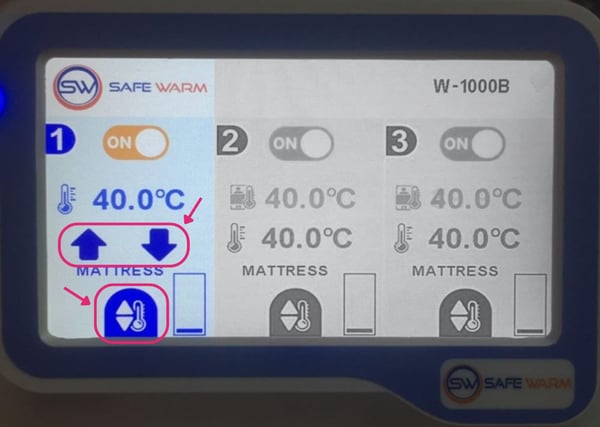
Use the LCD touchscreen on the control unit to set the temperature as follows:
- Press the “Set” icon 🌡️
- Use the increase/decrease icons to adjust the temperature in 0.1°C increments ⬆️⬇️
- Press “Set” again to confirm 🌡️
How long does it take to reach 37°C?
The system typically takes 3–15 minutes to reach 37°C at room temperature (23±2°C).
What happens if the pad doesn’t heat above 30°C in 10 minutes?
If the pad doesn't reach over 30°C in 10 minutes, the system triggers an INOP alarm.
Alarms
What alarms does the system have?
- High Temperature Alarm
- Pad Alarm (malfunction/disconnection/short circuit)
- Temperature Deviation Alarm (±1 °C from the set temperature value)
- Power Alarm
- INOP Alarm
Can alarms be muted?
Yes, except for the Power Alarm, which cannot be muted. Press the 'Alarm Mute' button to silence alarms for 10 minutes.
Cleaning & Maintenance
Can pads be washed or immersed in water?
No, pads contain electronics and must not be immersed or machine-washed. Only reusable covers can be washed.
What disinfectants can be used?
Colourless liquid disinfectants, 70% ethanol-based sprays, or chlorine solutions (5,000–10,000 ppm), followed by wiping with a damp cloth.
How often should the system be serviced?
At least once every 2 years by authorised service providers.
Technical & Warranty
What is the expected product lifespan?
- Control units: 10 years
- Pads: 7 years (with reusable covers)
What is the warranty period?
The Safewarm Patient Warming System comes with a 1-year limited warranty against material and manufacturing defects.
What situations are excluded from warranty?
The following situations are excluded from the warranty:
- Improper use
- Unauthorised repairs
- Use of non-original parts
- Physical damage
Troubleshooting
What should I do if the screen shows “HIGH TEMP”?
Turn off the device, wait for the pad to cool, then restart. If the issue persists, contact technical service.
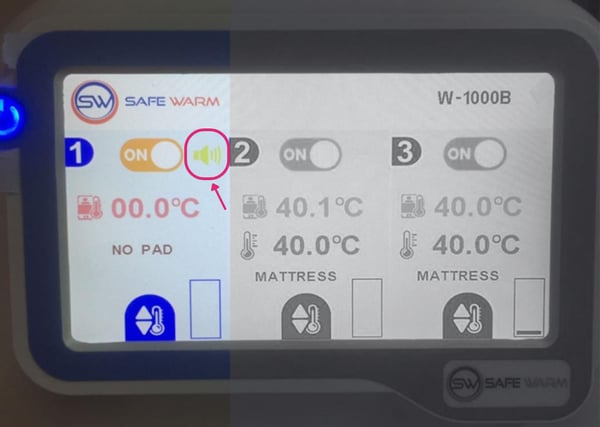
What does “NO PAD” mean?
"NO PAD" indicates that the pad is disconnected or faulty. Check connections and cables.
What does “INOP” mean?
"INOP" indicates that the pad failed to heat above 30°C within 10 minutes. Restart the system and check connections.
How do I change the language on the digital display?
Whilst unlikely, it is still possible that the digital display of your Safewarm Control Unit is showing the wrong language. To change the language on your control unit's digital display, follow these steps:
- Press the power button to turn the control unit on.
- Press and hold the Safewarm logo at the top left of the screen until text shows at the top and arrows show on all three sections of the screen.
- Press the logo twice until just the middle section of the screen shows text and arrows - you will now be on the language setting.
- Press the arrows up or down until you reach your desired language.
- Press the power button to turn the control unit off again. Your language settings will now be changed and saved.